
The Process Specification documents how a process is configured, and includes information about how the process has changed over time. The most common scenarios where you might want to generate a specification report include (a) as documentation for important business processes; (b) for risk, audit or compliance reviews; (c) to facilitate the communication between teams and team members of how a process works; and (d) to periodically review important business processes for correctness.
How to view a process specification report
1. Open the process.
2. Click on the menu item on the left Properties.
3. In the Data Features section click on Get specification report.
The "specification" section of the report will contain the groups, steps and instructions in your process - along with the details of each:
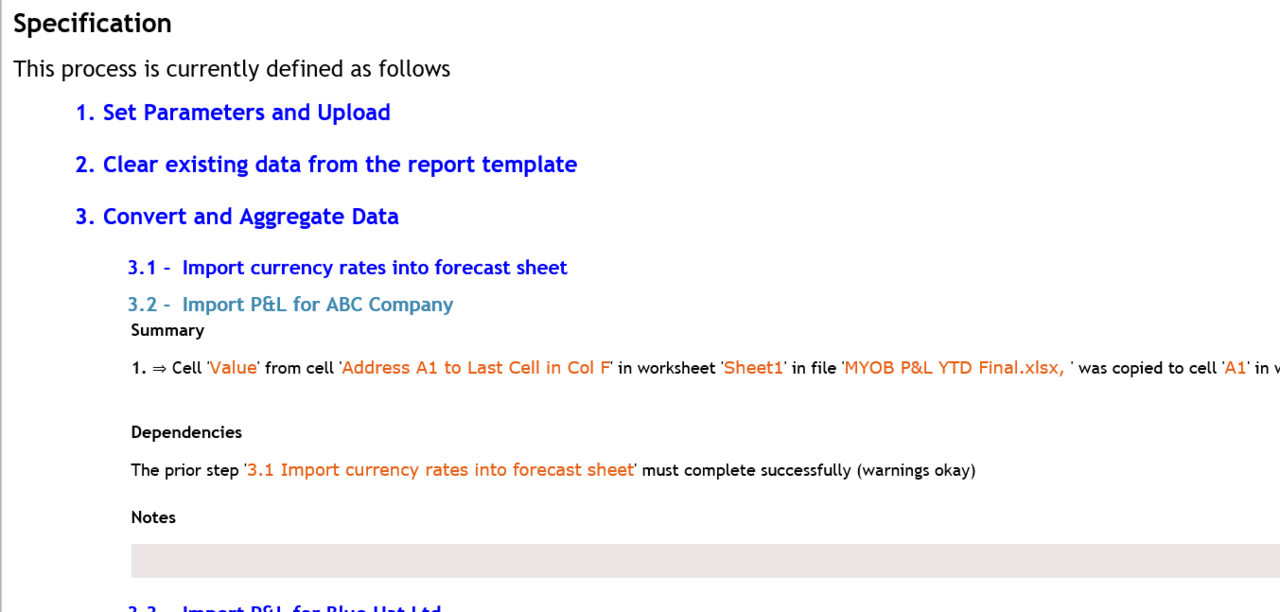
The information (shown above) is at a level of detail that:
- Will allow a user to recreate the process (in SolveXia); and
- Allow the process to be replicated manually (i.e. using the data and files on a desktop).
Comments
0 comments
Please sign in to leave a comment.