
The extract text and copy step provides a simplistic way to clean data through an automated SolveXia process. In many cases, this can replace the need to write complex SQL queries to extract deeper insights from data that is not structured the way you would like it.
Text Splitting:
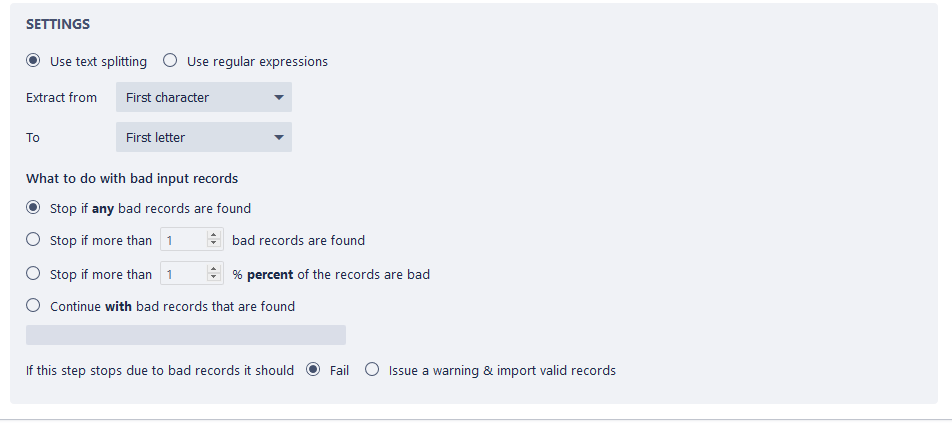
The “Text Splitting” steps provide the user with the capacity to set up more simplistic splitting cases such as splitting First Names and Last Names into separate columns. It allows the user to extract on the basis of the first/last character, letter, number or white space.
Regular Expressions:
The use of regular expressions allows us to check if a specified subset of characters, numbers and white space can be found within the targeted column. It also allows the user to check how many instances exist within each row.
For example, the set up below firstly finds all of the instances of 4 that exist in column 4. It then extracts the 4’s and concatenates them with the target cell (the closest empty cell adjust to the copied data). 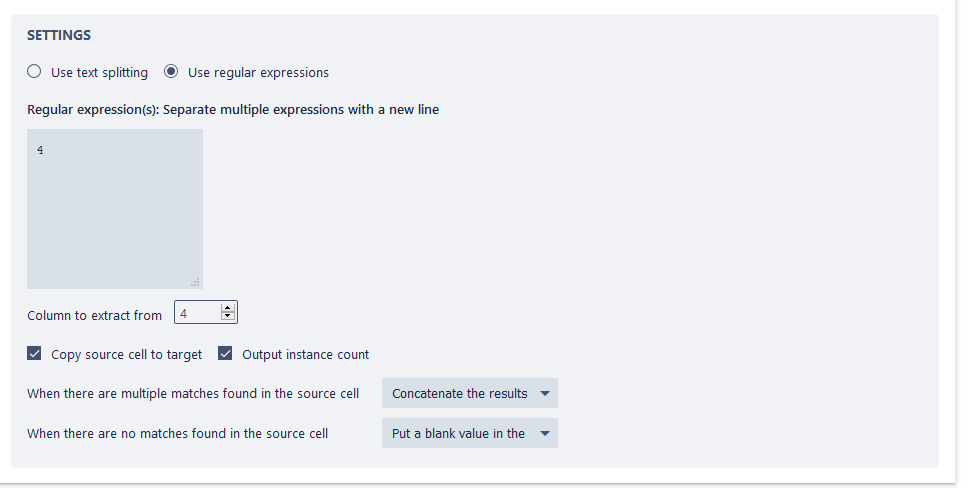
Comments
0 comments
Please sign in to leave a comment.