
Some types of processes need to perform identical processing to data from a set of input files. Making copies of the same instruction acting on each file is one way of configuring the processing, however this can make it difficult to maintain the process if the processing needs to be modified. In addition it might be the case that the number of input files varies with each process run, which presents a challenge for how many file placeholders need to be set up at design time.
A solution to this is to make use of zip processing capability in the file manipulation instructions. The trick here is to configure the instruction as you would to process a single file, but instead of linking to one file you link to a zip containing multiple files. SolveXia will then loop through all the files in the zip file and perform the same processing to each.
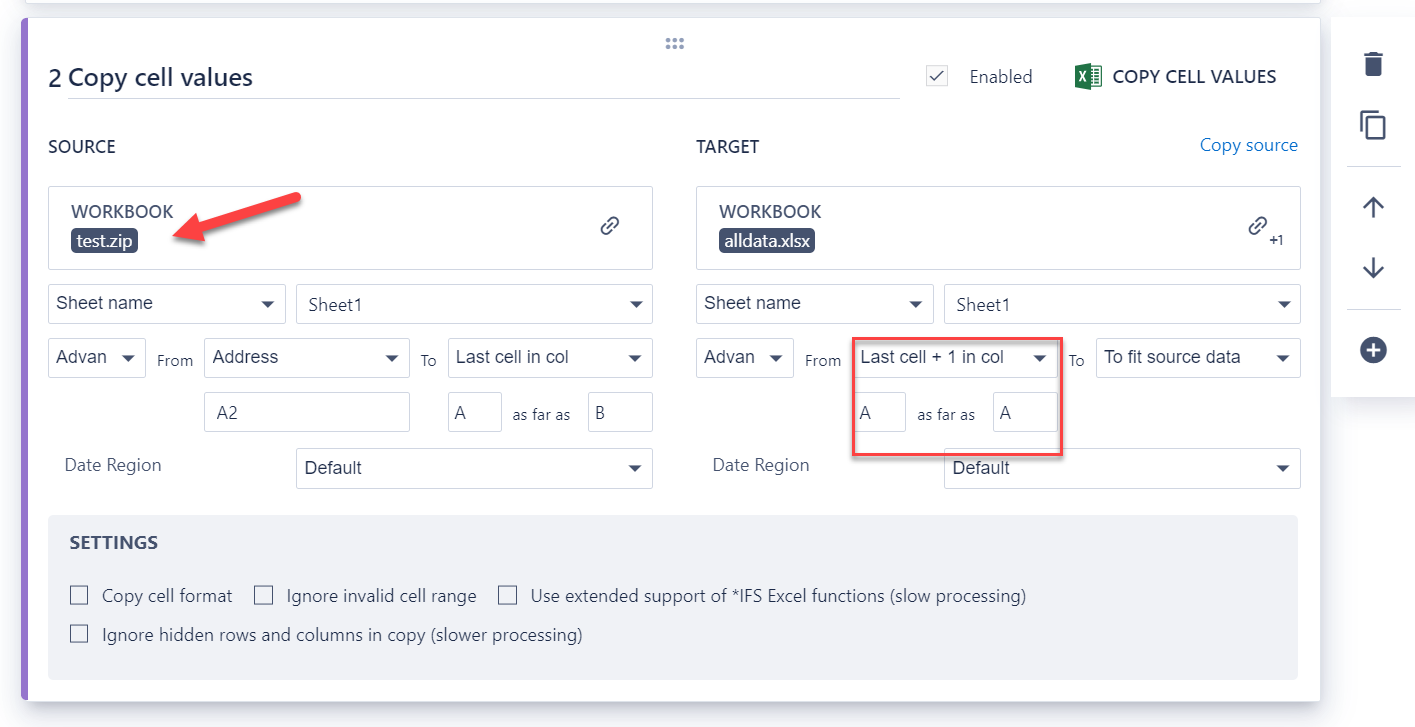
The screenshot below shows an example where we have a zip of Excel files and wish to take data from Sheet1 in every input file in a zip and then collect it all in one single spreadsheet.
There are a few items to note when configuring instructions linked to a zip file:
- when you select a zip file as the input 'workbook' the system won't populate the list of sheets in the drop down list, but you can just type this in.
- you might need to use a sheet index instead of a sheet name if the names of the sheets are not consistent across the collection of files.
- you will need to think about what needs to happen differently on the target if you are processing multiple files. In this example on the target range it is important to set the start of the range as a 'last cell + 1' type address, otherwise you'll just overwrite data from the prior file in the loop.
Comments
0 comments
Please sign in to leave a comment.